Mobile app based check-in system for events

QuentryX turns every ticket sale into a unique QR-code ticket, emails it automatically, and shows the ticket status from a single scan at the gate.

Case study: Live at the Budapest International Film Festival 2026, for 9 days, across multiple venues and ticket types
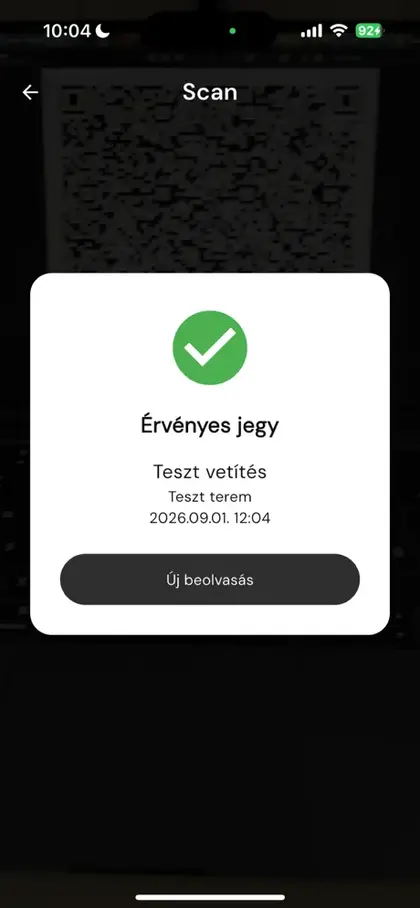
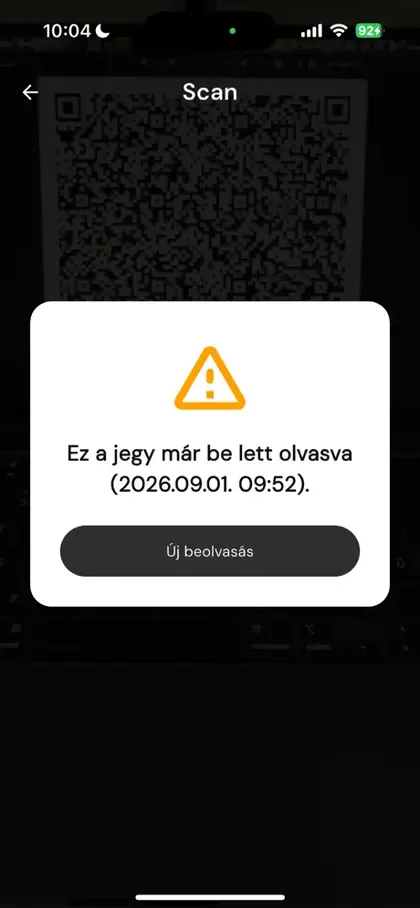
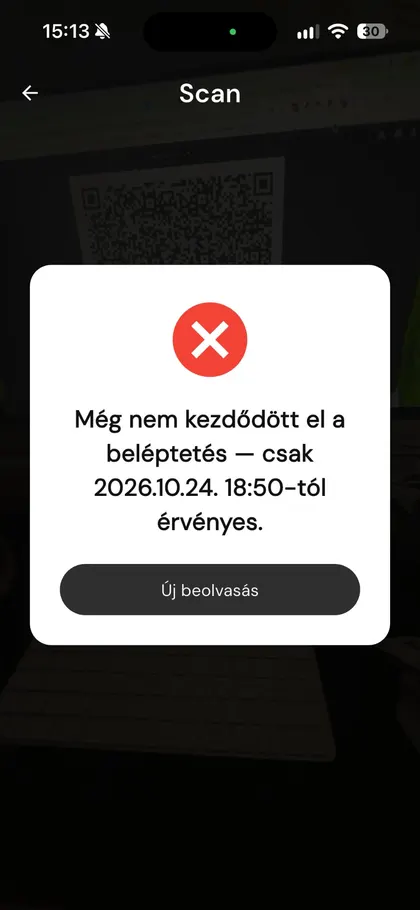
QuentryX: valid ticket, showing the film, the room and the time QuentryX: ticket already scanned, with the time of the first scan QuentryX: check-in has not started yet, the app shows when the ticket becomes valid
Valid ticketLet the guest in
QR ticket sentAutomatically, after a successful order
~1 secaverage check-in time
Own admindashboard to monitor and manage check-in
5/5organizer rating for communication and support
1000+emails sent with 99.4% delivery
How it works

An automatic QR-code ticket by email after every purchase

Four steps run in the background with no manual work. Meanwhile your website keeps working exactly as before.

01

Purchase on your website

Every product is a separate ticket type. The buyer purchases the ticket and receives the QR-code ticket by email.

02

Successful order

The order status is the trigger. QuentryX reads the order: who bought, for what, how many tickets, and which ticket type.

API
03

QR ticket by email

A unique QR code is generated for every ticket using your own ticket template, and sent as a PDF in a transactional email.

PDF + email
04

Scan at the gate

The staff member’s phone scans the code and instantly shows the ticket type, venue, time and validity.

iOS + Android
From the gate staff’s view

Fast, simple and stable.

Gate staff don’t have to remember anything or browse lists. The app tells them what to do with colour and text.

Valid ticket screen

Valid ticket

A green check mark, with the ticket details, venue and time below it. The guest can go in.

Already scanned ticket screen

Already scanned

Shows the exact time of the first scan. A ticket gets in once, even if it is tried on two different devices.

Check-in not started yet screen

Too early

The ticket is valid, but the room is not open yet. The app shows from when.

Scan

Invalid ticket

Scan again

Invalid ticket

A cancelled purchase or a code not issued by the system. This ticket does not get in.

Green: go ahead. Orange: already seen, or too early. Red: no entry.
Admin dashboard

Every order, every ticket, in one place.

Search by email address or order number, resend, print or revoke a ticket in one click, invite gate staff, manage integrations and schedules. In Hungarian and English.

QuentryX admin
QuentryX admin: order list with ticket type, venue and check-in status (demo data) QuentryX admin: inviting users with admin and user roles (demo data) QuentryX admin: integrations, connectors, schedules, ticket and email settings

Real admin screens, with demo data.

Customer support in one clickIf a buyer can’t find the email, look them up by email address and resend or print their ticket.
Separate access per eventAdmin and gate-staff roles, by invitation. One email, one password, multiple devices.
Schedules and ticket templatesYou set when the system lets people in, and which ticket template belongs to which product.
Technical background

Under the hood.

Webshop integration

Watches order statuses and reads the order and line-item data through the API. You don’t have to rebuild your shop: products, SKUs, options and order statuses form the basis of the ticketing system.

Built for peak load

Bulk QR generation and delivery even when most orders arrive at once.

1,500tickets within 10 minutes

Mobile app

On iOS and Android, on the gate staff’s own phones. Multiple devices work at once, yet a ticket gets in only once.

Validity window

For every occasion you can set how long before the start check-in opens. In case of congestion the organizer adjusts it themselves.

New products automatically

If a new occasion is added to the shop along the way, the system recognizes it with no extra setup.

Price tiers and ticket templates

One product can run several prices, and every price tier or ticket type can have its own ticket template. At the opening party of BIFF it ran like this:

Early Birdtickets 1–28
Presaletickets 29–128
Full pricefrom ticket 129

Hungarian and English

The admin dashboard is available in two languages, so it works with international crews too.

Case study · BIFF 2026

A film festival that worked like a webshop.

The Budapest International Film Festival 2026 took place between 24 October and 1 November at the Corvin cinema and external venues. Tickets were sold in the festival’s Shoprenter webshop, and QuentryX handled check-in.

Thanks for all the flexibility during the peak period!

The BIFF organizing team, partner feedback

Multiple ticket types at different prices. Three price tiers and three separate ticket types, for up to 825 tickets.
Handling unexpected ticket types. The system recognized the new products, so ticket sales could start immediately and check-in was no obstacle either.
Avoiding congestion. At the organizers’ request, we built in the ability for them to set ticket validity times themselves.

Read the full case study

“…it’s good when we can adjust this by hand in situations like this, and luckily you solved it the next day.”

A sold-out screening at the Budapest International Film Festival 2026

Partner rating

Based on the BIFF organizing team’s questionnaire, on a 1–5 scale

Communication and cooperation
5/5
Support received
5/5
Speed of issue handling
5/5
Tickets arrived on time
5/5
Locations

International experience

With our applications we have supported business events across several continents and time zones.

LondonBécsBudapestChicagoMexikóPerthSydneyMelbourneAuckland
9 locations3 continents6 time zones
LondonViennaBudapestChicagoMexicoPerthSydneyMelbourneAuckland
Who it’s for

If you sell tickets, passes or seats.

FestivalsConcertsCinema and theatre eventsConferencesWorkshops and trainingsTastingsFactory visits, guided toursMuseum and exhibition ticketsWebshops with their own events
A webshop confirmation is enough

If you only collect registrations and there is no check on site, the shop’s order confirmation is enough on its own.

You need QuentryX

If tickets must be checked on site, are tied to a time or a room, and it matters that a ticket can be used only for a specific occasion.

FAQ

Frequently asked questions

Which websites does it work with?

At BIFF it ran live with a Shoprenter webshop. In the Integrations menu of the admin dashboard, other webshops or ticketing systems can be connected as connectors. Book a demo and we’ll go through the details free of charge.

Do I need special devices for check-in?

No. QuentryX runs on iOS and Android, and gate staff can use their own phones. The app can be downloaded from the App Store and Google Play.

How do gate staff get access?

You invite them by email address in the admin dashboard, with an admin or user role. Everyone signs in with their own email and password and sees only the tickets of that event.

What if a buyer doesn’t receive or can’t find their ticket?

In the admin dashboard you look them up by email address or order number and resend or print their ticket in one click.

What happens if someone tries to use the same ticket twice?

On the second scan the app shows an orange warning with the exact time of the first scan. Even if the two scans happen on two different devices.

Next step

Let’s look at your event.

In a 20-minute call we go through what you sell, where your webshop runs, and what it takes for a single scan at the gate to decide.

Book a 20-minute demo